
OVL as Kafka Source Connector
Logging industrial data to Kafka made easier!
Our ogamma Visual Logger for OPC now can be deployed as Apache Kafka Source Connector!
Works well with Cofluent and Redpanda Connect implementations.
Free software/tools
Industrial Data Collector
Industrial Data Collector is an integration tool that harvests industrial control data from OPC UA servers, and stores & forwards it to databases or MQTT brokers. The former name is ogamma Visual Logger for OPC.
Community Edition is free forever for commercial use (limitation: up to 64 variables).
Runs in Docker: https://hub.docker.com/r/ogamma/idako, as well as on Windows, Linux, and Raspberry PI/ Siemens IoT2050.
For details on deployment and using it, refer online User Manual.
Industrial Data Explorer
Industrial Data Explorer is a two-in-one web application for exploring industrial data published on MQTT brokers and exposed via OPC UA servers.
Runs in Docker: https://hub.docker.com/r/ogamma/ide
Live demo is available at https://ide.opcfy.io Feel free to register and try to connect to publicly accessible OPC UA servers and MQTT brokers listed below.
Hint: after login, to add connections, click on the gear icon at the top right corner.
For details and to report feedback / issues please visit the product page on GitHub.
OPC UA Servers
Recently, one of our customers asked: What OPC UA Servers are available to test OPC UA client applications, such as ogamma Visual Logger for OPC (now re-branded as Idako: Industrial Data Collector) ? In other words, they needed to simulate a data stream that an OPC UA Client could ingest using the OPC UA Server interface.
There are many demo/simulation OPC UA servers available that you can either download and run on your PCs, and also there are some already running instances with public endpoints available to connect over the Internet. Here is the list:
| Product name | Vendor | Platform | Link |
| OPC UA Simulation Server | Prosys OPC | Windows, Linux, MacOS |
https://prosysopc.com/products/opc-ua-simulation-server/ Public OPC UA Endpoint: opc.tcp://uademo.prosysopc.com:53530/OPCUA/SimulationServer |
| OPC UA Weather Server | One-Way Automation | Linux + Docker |
Public OPC UA Endpoint: opc.tcp://ows.opcuaserver.com:4855/ Hint: Call method Objects/Weather/AddCity to add your location. Pass 2 arguments: 2-letter country code (https://en.wikipedia.org/wiki/ISO_3166-1_alpha-2) and city/location name. |
| OPC UA C++ Demo Server | Unified Automation | Windows |
https://www.unified-automation.com/downloads/opc-ua-servers.html Requires registration (free) to download Public endpoint, hosted by One-Way Automation: opc.tcp://opcuaserver.com:48010 |
| Eclipse Milo OPC UA Demo Server | Open-source, the main contributor is Kevin Herron (Inductive Automation). | Written in Java, runs on Windows, Linux, Docker. |
https://github.com/digitalpetri/opc-ua-demo-server Public OPC UA endpoint URL: opc.tcp://milo.digitalpetri.com:62541/milo |
| OPC PLC Server | Microsoft | Cross-platform .NET application. Runs on Windows, Linux, Docker |
Docker image: mcr.microsoft.com/iotedge/opc-plc Public endpoint hosted by One-Way Automation: opc.tcp://opcplc.opcfy.io:50000 Note: only secured connections are allowed. Client certificates will be accepted automatically. |
| Node OPC UA Server | Sterfive | Cross-platform | Public endpoint: opc.tcp://opcuademo.sterfive.com:26543 |
Public MQTT Brokers
When we created recently Industrial Data Explorer, we needed to have also publicly available MQTT brokers. Below is a list of
some MQTT brokers we used for tests:
| Product name | Vendor | Host name |
| MonsterMQ | Andreas Vogler | test.monstermq.com |
| Mosquitto | https://mosquitto.org/ | test.mosquitto.org |
| EMQX | https://www.emqx.com/en | broker.emqx.io |
| HiveMQ | https://www.hivemq.com/ | broker.hivemq.com |
MQTT vs OPC UA
Introduction.
It is very common to read about MQTT protocol that it is very lightweight in terms of network traffic:
MQTT is an OASIS standard messaging protocol for the Internet of Things (IoT). It is designed as an extremely lightweight publish/subscribe messaging transport that is ideal for connecting remote devices with a small code footprint and minimal network bandwidth.
(Quote from MQTT home page).
At the same time, OPC UA is often considered heavier than MQTT.
For me, this was not something obvious and expected. Because the most popular encoding used in OPC UA is TCP binary, which usually is more efficient and lightweight than free text formatting used in MQTT payloads.
When I found this report by Johnathan Hottell, about OPC UA and MQTT benchmarks and saw that the MQTT payload is JSON formatted (in which each data value transferred includes multiple key-value pairs, for the values itself and for the timestamp), I thought, how come this can be lighter than OPC UA binary formatted payload? And decided to reproduce these tests myself.
Test methodology.
OPC UA Server and Variables.
In the initial tests, I picked the same number and type of data variables. And later decided to re-run tests, in a more controlled setup. I thought that for easier reproducing, it is worth using a popular and easily available OPC UA server as a data source, which can provide simulated data. OPC UA C++ Demo Server from Unified Automation was the obvious choice. The set of default variables does not have a number of variables of types used in the tests run by Johnathan Hottell, therefore I had to select a different set of variable types, but still, the total number of variables is 24. Their node identifiers can be found in the Excel file with test results.
MQTT Broker.
EMQX broker running as a Docker container was chosen, because of easy deployment and use, and support for secured connections out of the box, without generating and installing the SSL certificate.
Test applications generating OPC UA and MQTT traffic.
2 applications that can convert OPC UA data to MQTT were used:
- ogamma Visual Logger for OPC, the product of our company. For tests, you can use its Free Community Edition. For instructions on how to install it and use it, please refer to its online User Manual. Version 2.1.4 was used.
- Cogent DataHub from Skkynet.From this link, you can download the trial version. Used version 9.0.10.747.
Using OPC UA to MQTT converter applications makes sure that the same data values are collected over OPC UA connection, and then published to the MQTT broker, as well as received by the subscriber application.
As MQTT Subscriber, MQTT Explorer version 0.4.0 Beta-1 was used.
Measuring network traffic.
To capture OPC UA and MQTT packets, WireShark was used. 2 instances – 1 for OPC UA traffic on port 48010 was running, and the second for MQTT traffic on port 1883 for non-secure connections, and 8883 for secured connections.
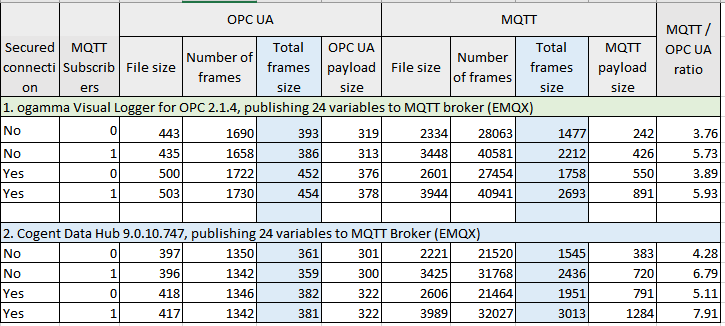
For each test case, 4 metrics were collected:
- Size of file, where captured packets are saved from WireShark, in Kb.
- The number of captured frames.
- Total frames size – the sum of all network packets sizes. This includes all protocols, can be viewed in Wireshark via menu Statistics / Protocol Hierarchy, line Frame, column Bytes, converted to Kb.
- OPC UA payload size – as shown in line OPC UA Binary Protocol, column Bytes in Wireshark, dialog window opened by menu Statistics / Protocol Hierarchy, converted to Kb.
- MQTT payload size – as shown in line MQTT Telemetry Transport Protocol (in non-secure mode), or Transport Layer Security (on secured mode), column Bytes in Wireshark, dialog window opened by menu Statistics / Protocol Hierarchy, converted to Kb.
Configuration of test applications.
Each test application is configured to collect data from the OPC UA Server for selected 24 variables and log data to the MQTT broker. For configuration steps, please refer to the documentation of the product.
In the OPC UA side, both Sampling interval and Publishing should be set to 1 second.
MQTT Topics for variables in ogamma Visual Logger for OPC were set to Test24/[VariableDisplayName]. For example, for the variable with browse path Objects/Demo/001_Dynamic/Scalar/Boolean it is set to Test24/Boolean.
In Cogent DataHub, topics were a little bit longer, set to Test24/[Browse Path]. For example, Test/Demo/Dynamic/Scalar/Boolean.
The MQTT payload was set to the variable value, converted to a string (not JSON format, to keep payload size smaller).
Running tests.
Test applications should be shut down before starting tests.
First, 2 Wireshark instances should start. They should not detect any packets yet. Then one of the test applications starts. Wireshark should display captured packets. After 5 minutes, the test application stops, and no more network activity should be seen in Wireshark. Capturing stops, and packets saved into files. And then metrics can be taken: file size and data displayed in the dialog window Statistics / Protocol Hierarchy.
For each application used (ogamma Visual Logger for OPC and Cogent DataHub), tests run 4 times:
- Both OPC UA and MQTT communication is in non-secure mode, and there is no subscriber connecting to the broker (the MQTT Explorer does not run).
- Both OPC UA and MQTT communication is in non-secure mode, and MQTT Explorer runs, with a subscription to the topic Test24/#. That is, data is delivered from Publisher to the Subscriber.
- Both OPC UA and MQTT communication is in secured mode, and there is no subscriber connecting to the broker (the MQTT Explorer does not run).
- Both OPC UA and MQTT communication is in secured mode, and MQTT Explorer runs, with a subscription to the topic Test24/#. That is, data is delivered from Publisher to the Subscriber.
Test Results
Zip file with all captured packet files and test results in Excel file can be downloaded from here.
The summary of collected test results is given in the table below.
Conclusion
Total network traffic in the case of using MQTT protocol is multiple times (from 3.76 to 7.91 depending on the test case) higher than in OPC UA. Which does not correlate with results published by Johnathan Hottell.
Next Steps
It would be interesting to see what the metrics would look like if the MQTT payload is formatted in SparkPlugB, especially in compressed format. We did not have such an application converting from OPC UA to SparkPlugB (not implemented yet in our application, but it is in the roadmap, so stay tuned!). Perhaps in this case results will correlate with the results published by Johnathan Hottell.
If you can reproduce such tests, please share them with us!
Why our products are not open source?
Every once a while we receive inquiry asking about our products: is source code for it available as open source. It is not, and here is why.
If you look at open-source projects, you can see that they almost never compose the core business of their creators. If it is created by individual developers, it might be to showcase their skills for potential employers, or hobby project. Very often companies sponsor or moreover are main contributors to the project. In these cases it is never the core business of that company, instead, that company is the main user of that project. Making the project open source brings multiple benefits for such a company:
- Developers and users around the world contribute to the project by reporting bugs and sending pull requests with fixes for such bugs or with the implementation of new features. This lowers the cost of development and support of the project.
- Using open-source project makes it easier for third parties to use services provided by the company as its core business. So at the end cost of open source development is transferred to those end customers of core business services and products anyway.
- Microsoft is a strong supporter and now the main contributor to .NET OPC UA SDK (https://github.com/OPCFoundation/UA-.NETStandard). Why? Because it makes it easy for customers who are used to use Microsoft stack to collect industrial control data and push it to Microsoft Azure, which is its core business.
- Amazon is the main contributor to the SDK for connecting to AWS IoT from a device using embedded C (https://github.com/aws/aws-iot-device-sdk-embedded-C ). A significant portion of this project is MQTT client functionality, so it can be used as a generic MQTT client library too. Although the development of such MQTT client libraries is not what Amazon’s business is, they are the main contributors and made is open source, to pave the way for customers to use core business – AWS IoT platform.
- InfluxData made InfluxDb (https://github.com/influxdata/influxdb) open-source because their core business is providing services hosting InfluxDb in the cloud, so they are main users of this project and benefit from making it open source.
- The same with Confluent and other service providers who are the main contributors and users of Apache Kafka (https://github.com/apache/kafka).